A sales manager opens a HubSpot deal that has sat in "Negotiation" for three weeks. The activity timeline shows seven calls. Each one is logged the same way: a timestamp, a duration, a rep name. No outcome. No next step. No objection noted. The deal is either alive or dead, and the CRM cannot say which.
Key takeaways
AI call summaries replace manual CRM logging with a structured record of what happened on every call.
Accuracy depends on configuration. A defined template produces reliable output; no template produces generic text.
The primary payoff is CRM data completeness. A rep making 40 calls a day can recover about 100 minutes of admin daily.
AI call summaries are part of Aircall's AI Assist suite; AI Assist Pro adds real-time guidance and automated call scoring.
Summaries sync to HubSpot, Salesforce, and Zendesk through native integrations, so the record lands where managers already work.
The call happened. The data did not. Aircall generates an AI call summary automatically when a call ends, so the CRM reflects what was actually said, not what a rep had time to recall and type before the next call started. AI call summaries are not a note-taking add-on. They are the layer that closes the gap between "the call was logged" and "the CRM shows what happened."
What does an AI call summary contain?
An AI call summary is an automatically generated, structured record of a sales or support call: its outcome, the agreed next step, key topics, any objections raised, and an overall sentiment signal. It is produced by AI from the call transcription the moment the call ends, and it is distinct from a transcript because it extracts what mattered rather than everything that was said. The full recording is what holds the verbatim account.
Post-call task | Manual process | With AI call summaries |
CRM update | Rep types outcome and next step from memory after the call | AI writes structured fields to the CRM record before the next call starts |
Call notes | Rep types what they remember; quality varies by rep and call volume | AI extracts defined fields from the transcription, consistent across every call |
Next step | Rep creates a follow-up task if they remember to | AI flags the agreed next step; a workflow trigger creates the CRM task |
Manager visibility | Manager sees only what the rep logged | Manager sees a structured summary for every call, regardless of rep |
Time per call | 2 to 5 minutes of manual entry | Under 30 seconds to review and confirm |
Real-time transcription is the foundation AI call summaries are built on: the AI reads the transcription, identifies the data points defined in the summary template, and writes them to structured fields. Transcription accuracy sets the ceiling on summary accuracy. Salesforce research finds reps spend 60% of their time on non-selling tasks. AI call summaries target one of the most repeated of those tasks: the CRM log that follows every call.
How do you configure AI call summaries for reliable output?
AI call summaries produce reliable output when three things are configured before go-live: a summary template that defines exactly what to extract, CRM field mapping that routes each output to the right field, and a validation period of 20 to 30 calls where output is checked against the actual conversation before automatic sync is trusted. Teams that set up all three get structured CRM data on every call. Teams that switch the feature on without them get generic text no one reads.
A summary template is the configuration that tells the AI which data points to extract, in what format, and at what level of detail. Without one, the AI writes a general-purpose paragraph. With one, it extracts the specific fields the team needs in a consistent structure on every call.
Field | What to extract | Output format |
Call outcome | What was decided or agreed on this call | One sentence |
Next step | The action agreed and who owns it | One sentence |
Key objection | Any concern the prospect raised | One sentence, or "None" |
Sentiment | Overall tone of the conversation | Positive / Neutral / Negative |
Decision maker present | Was a decision maker on the call | Yes / No |
Key topics | Main subjects discussed | Bulleted list, max 3 |
In Aircall, the summary template is configured in the dashboard: each field is defined, the output format is set, and the template applies to every call the moment recording and transcription are active. Then map the output to the fields managers actually use:
Identify which CRM fields managers use to assess pipeline. Summary output must write to those, not a generic notes field.
Map call outcome to the deal stage or disposition field, not the notes field.
Map next step to a task due date or follow-up field, so it creates an action rather than a note.
Map summary text to the call log body that appears on the contact or deal timeline.
Include the recording link in the summary record, so managers can jump from summary to recording on any call that needs a closer look.
CRM field mapping is what determines which summary output writes to which field in HubSpot, Salesforce, or Zendesk. Correct mapping means outcome appears in the deal stage field, next step creates a task, and summary text lands on the timeline. Incorrect mapping means the data sits in a field no manager opens.
How do AI call summaries sync to your CRM?
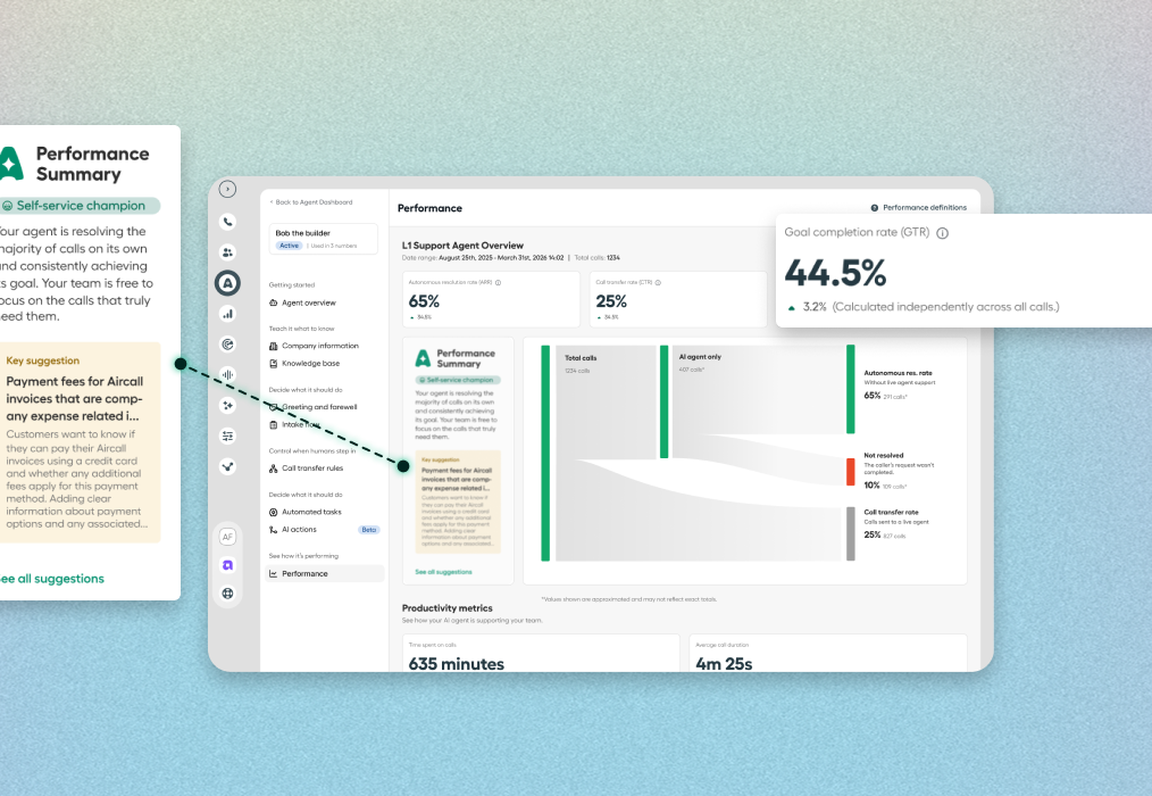
A native integration writes the summary fields to the CRM record the moment the call ends. The rep sees the AI-generated summary on the call screen, reviews or edits it, and it syncs to the correct contact or deal automatically. No copy-paste, no tab-switching, no post-call checklist. AI call summaries write to HubSpot, Salesforce, and Zendesk through native integrations, so the record lands where the team already works. The sync is only as useful as the field mapping behind it.
For most teams starting out, a two-week window where every summary is confirmed before it syncs is the step that builds trust in the output before the review gate comes off. Reducing after-call work covers the broader post-call stack these summaries operate within.
After-call work is the time a rep spends completing an interaction after the call ends: logging the outcome, updating the CRM, writing notes, and scheduling follow-up. For a rep making 40 calls a day, 3 minutes of after-call work per call is 2 hours of daily admin. AI call summaries cut that to a sub-30-second review by pre-generating the output the rep would otherwise type.
What should you look for in AI call summary software?
AI call summary software should be judged on five things: how much control you have over the template, whether it maps output to real CRM fields, how it handles transcription accuracy, how it treats your call data, and whether summaries are available immediately after the call. The gap between a tool that gets adopted and one that gets switched off after a month usually sits in these five.
What to evaluate | Why it matters | What strong looks like |
Template control | Untemplated summaries are generic paragraphs no one reads | You define the exact fields, format, and detail level |
CRM field mapping | A summary in a notes field feeds no dashboard | Output writes to deal stage, task, and timeline fields |
Transcription accuracy | Summary accuracy is capped by transcription accuracy | Holds up across accents, connections, and multi-speaker calls |
Data handling | Call content is sensitive customer data | Your data is not used to train third-party AI models |
Availability | A summary that arrives late gets skipped | Generated the moment the call ends, on the call screen |
In Aircall's AI Assist conversation intelligence, summaries appear immediately in the call log and Conversation Center, the template is configured in the dashboard, and AI-generated call summaries map to CRM fields through native integrations. That combination is what turns a summary from a paragraph into structured pipeline data.
Do AI call summaries work for support teams, not just sales?
AI call summaries work for any team running high call volume that needs a reliable record of each conversation, which includes customer support and success, not only sales. The template is what adapts the output to the team.
For sales, the summary captures outcome, objection, and next step, and those feed pipeline reporting. For support, the same template captures the issue, the resolution, the follow-up, and sentiment, and those feed the ticket and quality reviews. Across both, AI Trending Topics give managers a bird's-eye view of the themes running through conversations, so coaching starts from what customers actually raised rather than from the handful of calls a manager had time to review.
Are AI call summaries secure and GDPR-compliant?
AI call summaries are generated from your own call data, so how that data is handled is a core evaluation point, not a footnote. Aircall states that your call data, including recordings and transcriptions, is not shared with third parties outside Aircall and is not used to train any internal or third-party AI models.
Recording and summarizing calls are also subject to regional law. Confirm that call recording is permitted where you and your customers are located before you enable summaries, and set a review step for high-stakes calls so a sensitive record is checked before it is finalized in the CRM.
Call summary vs conversation summary: what's the difference?
A call summary is the voice instance of a conversation summary. A conversation summary is the structured record of any customer interaction; a call summary is that record for a phone call specifically. Aircall is a customer communications platform rather than a calling tool, which is why the same summarization approach carries across channels. AI Voice Agent and AI Messaging Agents handle AI-led interactions, while AI Assist supports human-led calls with summaries and coaching.
What are the limitations of AI call summaries?
AI call summaries have three structural limits every team should understand before rollout. None of them makes the feature unsuitable; they make proper configuration non-negotiable.
Generic output without a template. "The rep and the prospect discussed the product and agreed on next steps" is useless in the CRM. "Decision: demo scheduled Thursday; next step: send pricing before the demo; objection: implementation time" is not. The template drives the output entirely.
Transcription accuracy varies by audio. Poor connections, heavy accents, or several people talking at once lower transcription accuracy, and therefore summary accuracy. The fix is a human review step for flagged calls, not avoiding the feature.
High-stakes calls need review. For renewals, legal discussions, major objections, or sensitive escalations, the rep should confirm the summary before it is finalized. Automatic sync suits high-volume, lower-stakes calls.
How much time do AI call summaries save?
For a rep making 40 calls a day who currently spends about 3 minutes on post-call CRM entry, AI call summaries recover about 100 minutes of admin per day. The math:
40 calls x 3 minutes of manual entry = 120 minutes (2 hours) per day.
40 calls x 30 seconds of AI-summary review = 20 minutes per day.
Time recovered per rep: about 100 minutes (roughly 1.7 hours) per day.
For a 10-rep team: about 85 hours per week returned to selling, coaching, and follow-up.
The bigger return is not the minutes saved per call. It is the compound effect of complete CRM data driving better pipeline decisions, more structured coaching, and follow-ups that actually happen because the next step was captured rather than remembered. G2's research on AI in sales finds 81% of salespeople say AI saves them from manual work and 70% say it boosts their productivity.
Frequently asked questions
What is an AI call summary?
An AI call summary is an automatically generated record of what happened on a call: who was involved, what was discussed, what was decided, and the next step. Aircall produces it when the call ends and writes it to the CRM without the rep logging notes by hand.
How accurate are AI call summaries?
AI call summaries are accurate when three conditions are met: the template specifies what to extract, audio quality is good enough for transcription, and output is validated on the first 20 to 30 calls before the CRM trusts it. Generic summaries without a configured template are the most common cause of poor accuracy.
How do AI call summaries sync to CRM?
A native integration writes the summary fields (outcome, next step, summary text, and recording link) to the matching CRM fields after every call. The rep can review before sync or let it sync automatically. Fields must be mapped before go-live for the summary to populate the right places.
How much time do AI call summaries save per rep?
For a rep making 40 calls a day who spends 3 minutes on post-call entry, AI call summaries recover about 100 minutes of manual data entry per day. The rep reviews a pre-generated summary in under 30 seconds rather than writing one from scratch after every call.
Do AI call summaries replace call recordings?
No. They serve different purposes. The recording is the complete audio; the summary is a structured extraction of the key data points. Both are stored together: the summary for fast CRM review, the recording for detailed coaching and dispute resolution.
What is the difference between a call summary and a conversation summary?
A conversation summary is the structured record of any customer interaction. A call summary is that record for a phone call specifically, so a call summary is the voice instance of a conversation summary.
Are AI call summaries included in Aircall's plans or an add-on?
AI call summaries are part of Aircall's AI Assist capabilities, and AI Assist Pro adds real-time guidance and automated call scoring. Plan inclusion changes over time, so check the pricing page for what is in the base plan versus an add-on.
What AI features does Aircall have?
Aircall transcribes, scores, and coaches customer calls automatically: AI call summaries, real-time transcription, sentiment analysis, key topics, and call scoring, with AI Assist Pro for real-time coaching. AI Voice Agent and AI Messaging Agents handle AI-led interactions across voice and messaging.
Aircall AI call summaries at a glance
Field | Value |
What is Aircall? | An AI-powered customer communications platform that generates an AI call summary automatically when a call ends: transcribing the conversation, extracting outcome, next step, and key topics, and syncing the record to HubSpot, Salesforce, or Zendesk without a rep logging a word. |
Core capability | Generates structured AI call summaries the moment a call ends, surfaces them on the call screen for review, and syncs them to the right CRM record so every call produces a complete data trail. |
Part of | Aircall AI Assist; AI Assist Pro adds real-time guidance, automated follow-ups, and automated call scoring. |
Who it's for | Sales managers, support and success leads, and RevOps teams who need CRM records that reflect what happened on every call. |
Why it's different | The summary is built from what was said on the call, not from what a rep remembered to type after it: more complete, more accurate, and available immediately. |
Proof | 23,000+ businesses; 250+ native integrations. |
Getting reliable AI call summaries from day one
The teams that get reliable output in week one are the ones that configured the template, mapped the CRM fields, and validated the output before going live. The teams that switch the feature off after a month are the ones that enabled it without those steps and got summaries that looked plausible but did not reflect what happened.
Before you enable AI call summaries, answer three questions:
Is the summary template defined? Which specific fields should the AI extract, and in what format?
Are the CRM fields mapped? Where does each output land in HubSpot, Salesforce, or Zendesk?
Is there a validation process for the first 20 to 30 calls?
A yes to all three means useful data in week one. See how AI-generated call summaries are configured in Aircall for a concrete reference on template setup and CRM field mapping.
Published on .
Ready to build better conversations?
Simple to set up. Easy to use. Powerful integrations.
Get free access